Why: Overall, the theory is that Roadmaps could be a key pillar in KZ being more effective with clients, which then in turn creates greater client value, trust, engagement, permission, happiness, and retention.
Roadmaps are essentially a list of items that we could possibly do for a client geared to generate forward momentumfor the client (and us) as such:
Capture roadmap items continuously
Use the “next step format” to generate forward momentum and avoid “quote fatigue” or hesitation.
Communicate often with the client that you have done so.
Regularly have a “roadmap review” with the client to prioritize & encourage engaging in the next step (even mid-project).
For example, the best scenario with a “regular website project” is we go live with immediate follow-through items lined up that the client is excited to do & a longer term roadmap supported by a premium support package which we proactively pursue.
Goals (for the client)
The INTENTION of the roadmap is for KZ to be a proactive, trusted partner always looking to maximize/increase the value of their investment/asset & to help create and maintain forward momentum (which can often wain near end of project) – This is important to a client IFF the website is a strategic asset.
Document all possible enhancements or opportunities to achieve client objectives
Have a proactive trusted partner who is actively looking to increase the value of their assets
Create and maintain forward momentum
Results (for KZ)
Revenue: More consistent income and work with higher margins, including a shift from “sales” (non-paid) to “trusted consultation” (paid)
Recurring: Turns one-time projects into recurring revenue
Hosting & Steady State Support: Supports retention & value of our higher margin, scalable, recurring, commodity offerings (hosting & steady state)
#kindtoourfutureselves: Reduces pressure on new project revenues, allowing us to invest more in our future
Marketing: Increased opportunity for marketing assets (google reviews, case studies, testimonials), with more opportunities for “wow” moments
Product Development: Supports us doing general product & service development (what we do for one, we can do for others)
How to Create a Roadmap
If needed, copy the Roadmap Task list from our Large Website Projects Template
Add any and all items that COULD be future work for a client
Sample:
Preliminary Evaluation of CRM integration
Est; 6hrs (for JUST the preliminary evaluation)
Ballpark Size: Medium (20-30hrs) (first guess, this could be of medium size)
Description: Integration with CRM to reduce manual input and… (etc.), We think CRM integration is around 20hrs and will know more after the evaluation.
Title:
Focus on customer benefit
Use the “Next Step Format” for the task name (see below for details on this format)
Tags: Use the tag “Internal” if you think this roadmap item should be reviewed internally before going to the client
Estimated Time: Add an estimate for ONLY this next step (3hr, 6hr, 24hr, whatever makes sense).
Ballpark Size: If possible, add a preliminary size estimate for the entire item. Use the “Ballpark Size” custom task field. Size Guide:
N/A – Not part of larger effort (the estimate is all that’s needed)
Unknown: Very hard to tell without initial assessments
Small: 6-12 hrs (Maybe can be done within first step estimate)
Medium: 10-30hrs
Large: 25 – 45hrs
XLarge: 40+ hrs
Source: Where did this come from? Feel free to be descriptive. For example:
UMW / Visioning
BRD
UAT
KZ Common item
KZ observation that more improvements could be made
Description: Add notes in the description where it makes sense, such as:
More details on customer benefit – this is where we want to be memorable & help the client imagine what’s possible
Details on what this is about (description)
Thoughts on size (Possibly small; From past experience, likely 150hrs; etc.)
Any internal details we want can be added to the end or in comments
Priority: Take a first crack at priority based on our experience. Have also added a Prioritization field for a 1-10 range as that might be better
Notes / Next steps: This field is to add notes & next steps coming out of the roadmap review meeting with the client
The “next step format“
The intension of using the “next step format” is to:
Help prevent “quote fatigue” or hesitation
Increase forward momentum (deciding to proceed with the “next step” (or not) is an easier decision)
Show the value of research / scoping / investigation / estimations – which will support us being paid for exploration & scoping
Format: Item name – <next step>
The <next step> is the next VERY CLEAR step that can be taken to move this roadmap idea further WITH a time estimate.
If you can’t estimate, then you likely don’t have a good next step, try thinking smaller or being less precise.
Use our “Ready” process. ie; “What next step are you ready for”?
Examples:
ADP Job Opportunities API – Initial requirements intake
ADP Job Opportunities API – preliminary research
ADP Job Opportunities API – scope review & initial budgeting
Finding Roadmap Ideas
Go through past UMWs, UATs and any Steady State audits to see if there are any.
Review “out of scope” in BRD’s
Review any RFPs & proposals
Do an audit of the existing website. Some audits we have:
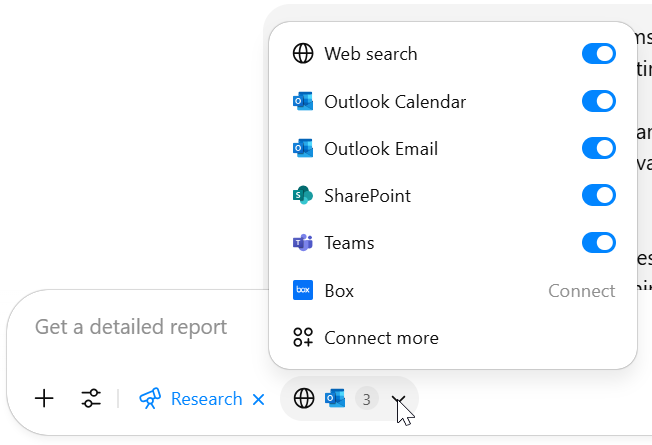
Use ChatGPT deep research to search Client Files, Teams, and your emails. (Do 1 & 2 first to clean up any obvious things that were done before ChatGPT – this way we aren’t reviewing inaccurate results with the team – DRY (Don’t Repeat Yourself)
review my sharepoint files, email, and teams message looking for TTC, TTC Pension Fund, TTCPP, TTC PP specific items for any possible outstanding items we could add to their website design & development roadmap Look at these specific SharePoint folders: “TTC Pension Plan” and subfolders Focus on messages in the time frame: all time Prioritize: design requests, feedback, approvals, and issues
Note, “Deep Research” requires a paid ChatGPT plan with various services connected:
Communicating With the Client
Try to communicate the “Roadmap” concept regularly. This will help normalize the roadmap concept and possibly create intrigue and acceptance as a good & professional way to do things.
In meetings, if something is NOT being done but could be in the future, say “we will put that on your roadmap“
In reports & audits list the things “put on your roadmap“
Roadmap Review Meeting
This is a more formal meeting which can be done during a or near the end of a project, quarterly or bi-yearly with Premium Support, or as a sales effort.
Important
We do want this meeting to be “easy” so it’s very important to be well prepared:
Review all the roadmap items to make sure the description is succinct
Order the items in a way that makes logical sense.
If there are “high priority” items put them first (you may not be able to get through everything)
End the review meeting early & set date for the next roadmap
Consider sending a list of roadmap items for review prior to the meeting
Consider presenting internally to team as practice
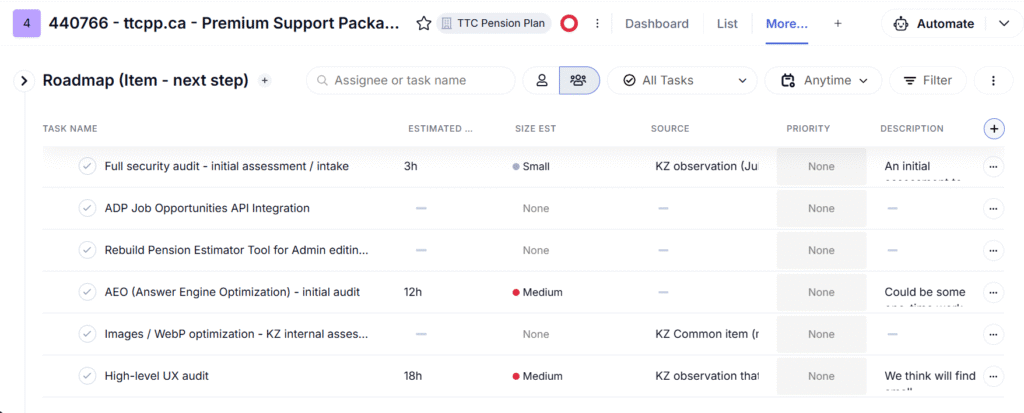
Table View
Use the Teamwork Table view with the custom fields added like this:
The (simple) Roadmap Review Agenda
Prioritize (Yes / No / Maybe / Consider Later)
If possible, note when a client would want to do the items if it isn’t right away.
When maybe decision? Ask when any “maybe” decisions might be decided
Ask if there are any key moments we should know about (such as board reviews, or next year strategy sessions, or budget cycles)
Book next roadmap meeting
After Review Meeting
Update the roadmap and update the Notes / Next Steps field with anything notes.
Send a summary document of the decisions made calling out the “Maybe” items and the date for when answers are expected.
(Summary document steps are being worked on between Brent & Mike)
Move any items that are to be done to the clients Backlog.
Modify “next step” as appropriate (more scope, less scope, questions client wants answered, etc.)
Get the items into production
Put any “No” items on a removed teamwork task list with notes so we can better understand client
Approach:
Make DECISIONS with summary document. Indicate if they are decisions recommended (vs. captured from client), such as:
Decided this is a NO (FYI)
Decided this is a MAYBE (FYI)
Decided to revisit this at X date.
Heard that this is a YES, moving forward unless we hear from you
Recommend YES (please confirm)
Consider doing in a Loop page, shared Word doc, or shared Excel so we can collaborate with the client
Exporting Teamwork Table to Excel
In Teamwork, select the Roadmap task list
Switch to TABLE view
Three dots, then REPORTS > TASK LIST REPORT Changes from the default settings:
INCLUDE LATE TASKS: YES
FORMAT: EXCEL
INCLUDE ESTIMATED TIME?: YES
In the target Excel sheet, clear the TASK LIST tab, then paste the new info onto the TASK LIST tab
Project Key Moments for Roadmap Creation
While things can be added to a roadmap at any time, there are some key moments in a clients life cycle that we can pay attention to or create specific processes & tasks in teamwork around.
Sales hand off: Add to project tracker
Client Kickoff: Introduce the “roadmap” concept & project tracker
Visioning Prep: Add to Visioning Prep homework (ie; a “where are you going?” section to help us plan accordingly) (TBD)
BRD delivery: Add phase 2 items heard & relevant to the “out of scope” BRD items. Review BRD/Roadmap to-date with client
Prioritize roadmap with client during or after BRD development (allows us to Surprise & Delight during the current project scope!)
Internal Development brief: Add BRD & Roadmap to agenda
Development / QAT: Add reminders or an agenda item for internal meetings – this is where we will uncover “compromises”, creative possibilities, or more technical roadmap things not considered yet.
Project status meetings: If doing & relevant, add “changes to roadmap” to agenda
Consider asking client to help prioritize the roadmap during these meetings
Consider asking the client if they’d like us to do the “next step ready” (for extra billing) for any items during the project
We can consider if we can “just do” something on the roadmap as a “surprise & delight”
Add a UAT Handover meeting? (Perhaps separate from the site preview & training meeting), including:
What accomplished, what we’re testing against, and what’s next (within current project)
Remind client that while we’re focused on THESE test cases, anything else THEY can add to the roadmap
Post launch sales: Review roadmap & plan next steps
PM: Schedule a “Roadmap Review” meeting with the client: Consider doing this first as it creates a deadline which is likely helpful for this sort of work
PM: Create a “Roadmap Creation” task in the “Account Director” task list for tracking time
PM: Assign to a project lead (PL) for the roadmap (The PM can also be the PL)
PM: Determine support team: Whoever worked on the site (check timelogs) & add to the “Roadmap Creation” task.
PL: Decide which of the audits we should complete – if any (see Finding Roadmap Ideas) & schedule them in. NOTES:
Not all audits need to be completed at once (some can be scheduled internally in our backlog for future additions to the roadmap)
As well, the audits themselves can be added AS “roadmap items”. E.g. “Perform an initial security assessment”
Check if the client has a Steady State that includes Performance or Accessibility Audits already, and if so when we plan on doing them (these are in the GANTT and Backlog – Angela/PM can also help)
PL: Determine if a “team brainstorm” is needed and if there’s any prep (such as audits) before so the team can come prepared
Use ChatGPT deep research, share with the support team to review & comment
Have internal meetings as needed to vet the roadmap for sharing with the client.
KZ (internal) Training
Training agenda for KZ internal team:
How to create forward momentum oriented (“next step” vs. “the thing”)
How to note ideas for internal discussion (even if in their infancy)
How to be problem / pain point / client benefit oriented
How to ballpark size & communicating uncertainty WITH forward momentum
Frequently Asked Questions
What are common things “possibly” missed with Roadmaps or Roadmap Review meetings?
Not using the “next step” format in the task name and trying to give the entire big picture of the task. The goal is forward momentum and the theory is that easy next steps support that.
Not using the Table format with the client.
Taking too long:
Explaining each item when the client may be familiar already
Focus on collecting yes/no/maybe then make edits later
Not preparing ahead of time
This is a targeted “sales” activity and we want to be very prepared so that the call is quick, painless, and the client gets maximum value so it is repeated.
Be prepared with each item if it’s PART of the benefit. (If it’s an “investigate to see if beneficial, then we don’t have to dig deeper other than giving the reason we think it’s worth investigating)
What if the client does not have a current project?
If a client is paying for the roadmap, then create as an Ad Hoc task list
If a client is NOT paying for the roadmap, then add as a Task List in the KZ Internal – Salesproject
What to do if the client’s project has ended & there are open roadmap items?
Same as “if the client does not have a current project” above
What other fields did you consider but did not include?
Considered but not included with roadmaps (for now) are these fields:
Type: UX, Marketing, Design, Automation, Integration, etc.
Effort (Guess): Low / Medium / High Used a more precise “Size” instead
Impact (Guess): Low / Medium / High Suggested adding to description instead
Stage
Idea Backlog (unfiltered ideas)
Next step (with estimate) (e.g., research, internal discussion, feasibility)
Suggested to Client
Accepted for Future Phase (Client is interested)
Parked (Kept for Future Consideration)
Rejected (Didn’t pass validation)
Feedback Loop
Learnings
Results
Changelog
Sep 10, 2025: Added to size “N/A – Not part of larger effort (the estimate is all that’s needed)”
Sep 13, 2025:
Added “Important” notes for roadmap review meeting (review in advance, order the items, end meeting early, maybe send roadmap in advance)
Changed the agenda to be yes/no/maybe/consider later (instead of priority) based on TTCPP & Bob Rumball review meetings
Added an “After review meeting” section
Sep 20, 2025:
Added to the “after review meeting” section (make decisions & using shared doc to collaborate)
Oct 26, 2025: (Based on Hector feedback)
Added emphasis in title & description to “focus on customer benefit” and “being memorable”
We prioritize internally first (1-10 scale – new “prioritization” field added)
Add to review meeting prep: practice internally first
Nov 8, 2025: (Based on review with Mike)
Added a “Sample” to the first “How to create a roadmap item”
Changed Est Size to Ballpark Size for clarity (and provided an example)
Added the new “Notes / Next Steps” field (place to add notes after roadmap review meeting) & updated the post-review meeting with this step.
Added to project plan: Determine if a “team brainstorm” is needed and if there’s any prep before so the team can come prepared & Clean up documents such as QAT, UAT, and BRD
Nov 30, 2025: Added “What are common things “possibly” missed”
Dec 2, 2025: Added “Training” section
Jan 6, 2026: Apply Hector’s strategic lens to this document (Why/How/What, then add Who/When) – Added parts of the “Execution Engine”, and “The Feedback Loop” (Added “learnings & “results” sections)